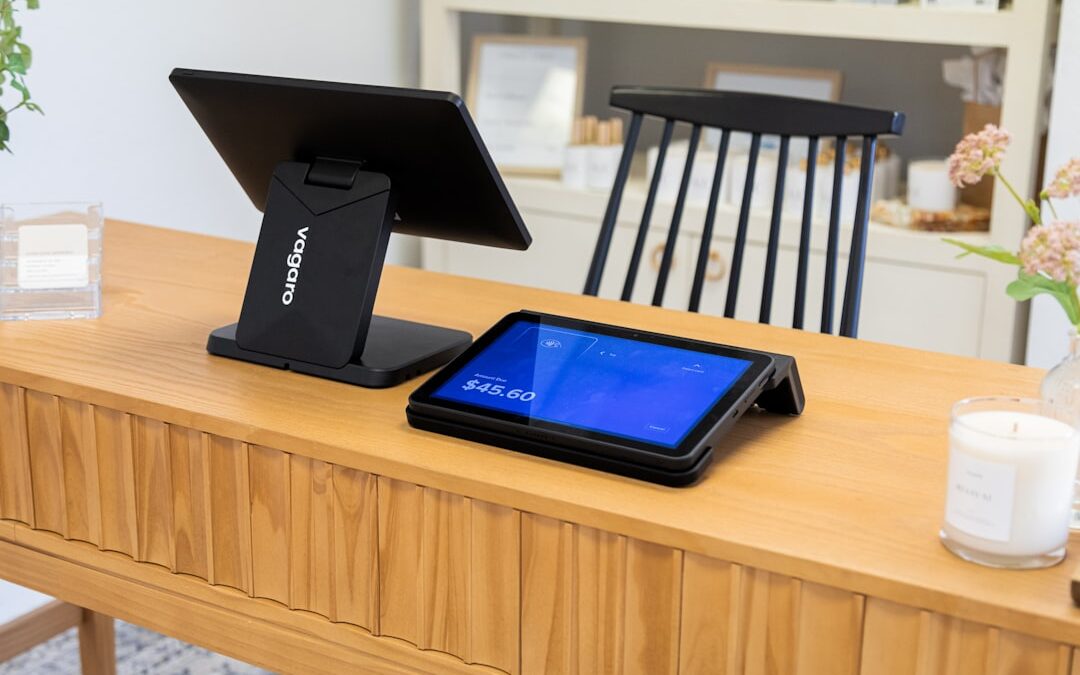
Why Modern Businesses Need Inventory Visibility Beyond the Checkout
Advanced POS with inventory management combines transaction processing with real-time stock tracking, automated purchasing, and data analytics. These systems eliminate manual counting, reduce costly stockouts and overstock, and provide centralized control across multiple locations—saving businesses up to 10% in inventory costs while improving customer satisfaction.
Key capabilities of advanced POS inventory systems:
- Real-time tracking – Stock levels update instantly with every sale
- Automated reordering – Low-stock alerts and auto-generated purchase orders
- Multi-location sync – Centralized inventory control across stores and warehouses
- Predictive analytics – Forecast demand using historical sales data
- Integration – Connect with accounting, e-commerce, and CRM systems
- Cloud access – Manage inventory from anywhere, on any device
Historically, inventory management relied on paper ledgers and spreadsheets—a manual and error-prone process. Today’s advanced systems transform the register into a central hub tracking every product from purchase to sale.
For large companies with complex supply chains—especially in home improvement, sporting goods, or automotive parts—inventory accuracy is critical. Coordinating manufacturing in Mexico, China, or Vietnam requires precise knowledge of stock levels to prevent costly disruptions.
Research shows 70.8% of a retailer’s cost is purchasing goods. Proper inventory software is thus essential, saving companies 10% on inventory costs by reducing stockouts and overstocking—millions for a large enterprise.
As a co-owner of a contract manufacturing company for over four decades, I’ve seen how advanced POS with inventory management systems give our clients visibility across global supply chains. From overseas production to domestic goods management, the right system provides the control large enterprises need.
Common advanced pos with inventory management vocab:
Core Features: What Makes a POS “Advanced”?
An advanced POS with inventory management is more than a cash register; it’s a sophisticated ecosystem offering control and insight. It integrates with your entire inventory lifecycle, going beyond basic transactions. Key advanced features include automation, real-time data, and comprehensive control, such as real-time tracking, cloud access, automated purchasing, supplier management, multi-location support, and product kitting.

From Scanners to the Cloud: Foundational Inventory Tools
Real-time inventory tracking, a cornerstone of advanced POS systems, instantly updates stock levels with every transaction. This visibility enables informed decisions to meet customer demand. This is achieved with tools like barcode scanning and label printing. Scanning speeds up checkouts and stock counts, minimizing human error. Our barcoding inventory management software ensures this process is seamless. Label printing allows for custom labels with product details and barcodes, which is essential for new products without existing codes, ensuring trackability.
Mobile scanners improve efficiency by enabling staff to perform counts, receive stock, or check prices on the go. This facilitates perpetual counts without disrupting operations. For instance, a warehouse worker in Thousand Oaks, CA, can scan incoming automotive parts, and the system instantly updates stock levels for sales teams in Los Angeles, CA.
Cloud accessibility is a non-negotiable feature. Advanced POS systems store data in the cloud, allowing inventory management from any web-enabled device. This is invaluable for multi-location businesses and those with global supply chains in Mexico, China, or Vietnam. Some systems offer offline functionality, syncing data once connectivity is restored. This ensures all locations, from Long Beach, CA, to overseas partners, have current information.
Automating Your Supply Chain: Smart Purchasing and Supplier Management
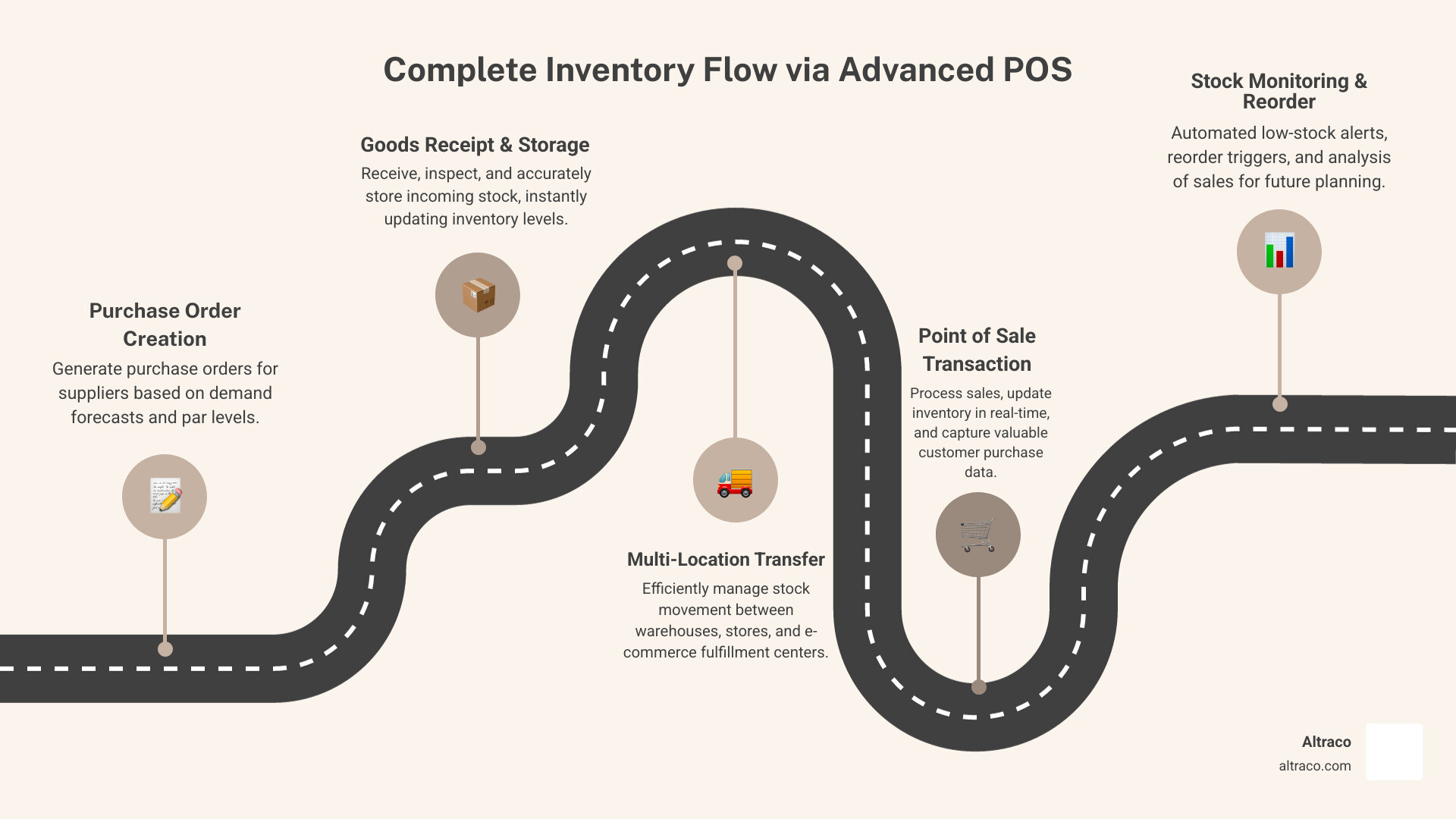
A key advantage of an advanced POS with inventory management is supply chain automation, which saves time and reduces manual effort. Automated reordering is a prime example. The system uses sales data and par levels (minimum stock thresholds) to suggest or generate purchase orders (POs). Low-stock alerts are triggered when inventory drops, preventing stockouts and lost sales.
For example, a California sporting goods retailer’s POS can monitor hiking gear sales. When a backpack’s inventory drops, the system automatically creates a PO for review, ensuring popular products remain in stock.
The system centralizes vendor databases, streamlining purchasing by managing supplier information, pricing, and purchase history in one place. When new inventory arrives, it’s reconciled against the PO, and stock levels are updated, ensuring accuracy and a clear audit trail. Our Supplier Scorecards Complete Guide highlights the importance of managing these relationships.
The Strategic Advantage of an Advanced POS with Inventory Management
Investing in an advanced POS with inventory management is a strategic move that transforms a business, impacting profitability, efficiency, and customer satisfaction.
Slashing Costs and Minimizing Waste
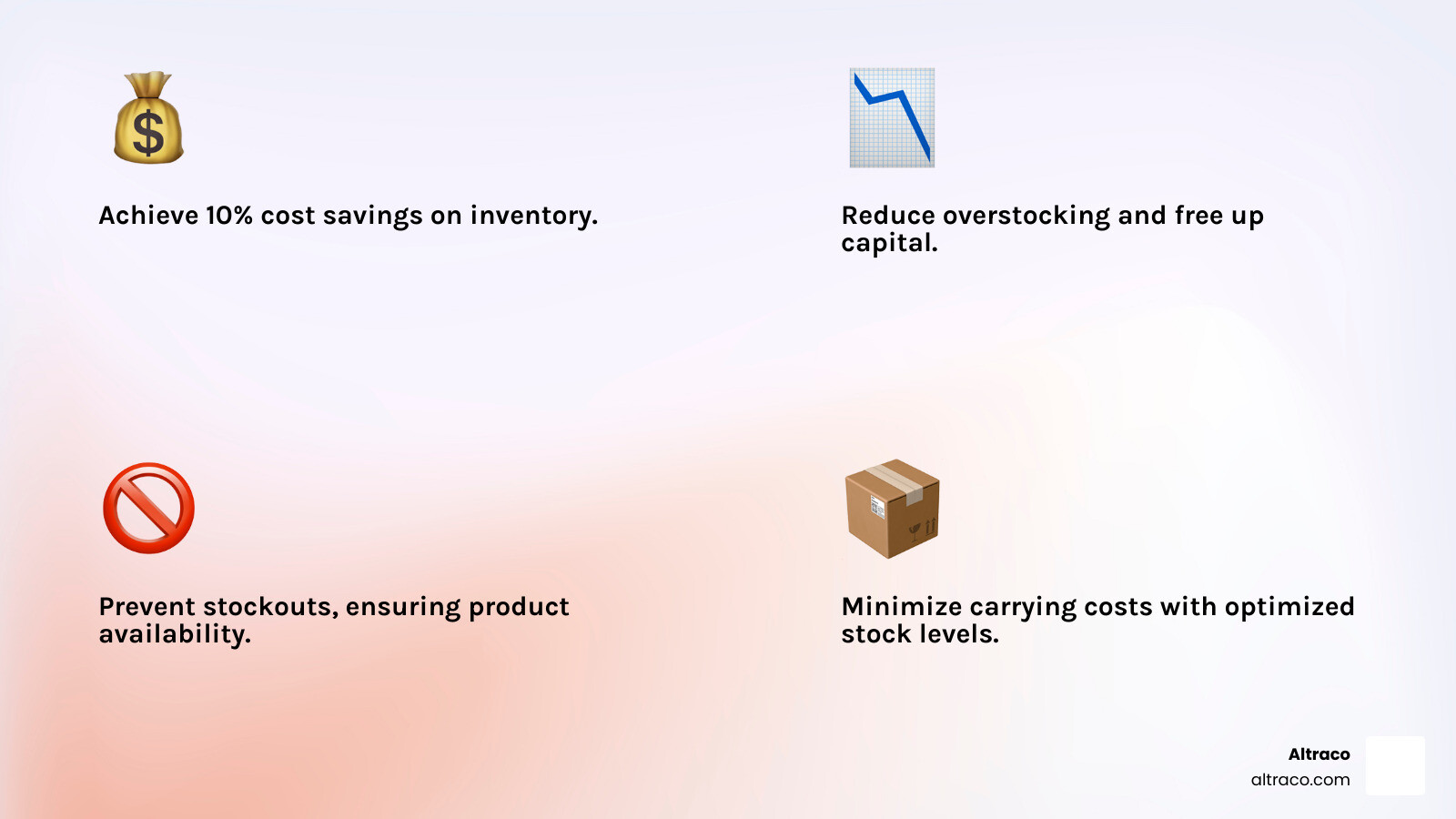
“Proper inventory management software is essential to your business’s bottom line.” This is a financial truth. Research shows that reducing stockouts and overstocking can save 10% of inventory costs. For businesses with high volumes of home improvement or automotive parts, this means substantial savings.
How it achieves this:
- Reducing Overstock: An advanced POS provides precise data to prevent over-ordering, which ties up capital, incurs storage costs, and risks obsolescence. This enables just-in-time ordering.
- Preventing Stockouts: Running out of popular items leads to lost sales. Automated alerts and smart reordering ensure best-sellers are always in stock, maximizing sales.
- Minimizing Carrying Costs: Optimizing inventory levels reduces carrying costs like storage and insurance, freeing up capital for reinvestment.
- Reducing Manual Errors: Automation cuts down on manual errors, saving time on corrections and providing a more accurate financial picture.
- Optimizing Storage: Accurate data on inventory movement helps optimize warehouse space, improving efficiency and potentially reducing storage needs.
These efficiencies are crucial for managing complex supply chains involving cost value engineering complete guide to optimize manufacturing.
Boosting Sales and Customer Satisfaction
Beyond cost savings, an advanced POS with inventory management improves the customer experience, boosting sales and loyalty.
- Ensuring Product Availability: Real-time tracking ensures accurate stock information across all channels, preventing customer frustration and ensuring prompt order fulfillment. This is vital for unique products like certain outdoor gear.
- Accurate Stock Information: Staff can provide immediate, accurate answers about item availability—whether in the backroom, another store, or in transit—building customer trust.
- Omnichannel Consistency: An advanced POS unifies inventory for businesses with physical and online stores. A customer in Los Angeles, CA, can check online for an automotive part and see it’s available for local pickup, creating a seamless, satisfying experience.
- Faster Checkouts: Barcode scanning and efficient interfaces lead to faster checkouts, reducing wait times and improving the shopping experience.
- Building Customer Loyalty: Consistently meeting customer needs with accurate information and smooth transactions fosters loyalty. Many systems integrate with loyalty programs to reward customers and personalize promotions, reinforcing relationships, similar to our focus on the value of buyer-supplier relationships.
Using Data: Reporting, Analytics, and Forecasting
In today’s market, data-driven decisions are essential, especially for businesses with global manufacturing and diverse product lines like sporting goods or home improvement. An advanced POS with inventory management turns raw data into actionable business intelligence.
Key Inventory Reports and What They Tell You
Advanced POS reporting offers a panoramic view of inventory health. Essential reports include:
- Sales Reports: Show what’s selling, when, and to whom, helping identify best-sellers and slow-movers to inform strategies, like seasonal stocking for outdoor products in California.
- Inventory Valuation Report: Details the total value of current inventory, retail value, and potential profit. This is crucial for understanding capital tied up in stock and analyzing pricing efficiency.
- Inventory History Report: Provides a complete view of all stock movements (receipts, adjustments, transfers) to identify patterns and track discrepancies.
- Stock Aging Report: Highlights how long items have been in stock, allowing for promotions to move old inventory that ties up capital.
- Inventory Expiry Report: Flags items nearing expiration, allowing proactive management to minimize waste (critical for certain sectors).
- Sell-Through Rate: Measures the percentage of inventory sold over a period. A high rate indicates efficiency; a low rate may signal overstocking.
- Gross Margin Return on Investment (GMROI): Measures the profitability of inventory investments, showing gross profit per dollar invested to help optimize product mix.
- Profit Margin Analysis: Analyzes the net profitability of products or categories to ensure pricing strategies are effective.
These reports empower us to reduce stockouts, cut waste, and boost profits, providing the necessary data for smart inventory control for retailers.
From Historical Data to Future-Proofing: Forecasting and Demand Planning
A key feature of an advanced POS with inventory management is its forecasting and demand planning capabilities, which use historical sales data to look forward.
- Predictive Analytics: The system analyzes past trends, seasonality, and promotions to predict future demand. For instance, it can predict a sales spike for a home improvement tool before a holiday and suggest stock levels.
- Machine Learning: Cutting-edge systems use machine learning to refine predictions over time, improving the accuracy of reorder suggestions and demand forecasts.
- Seasonal Trend Analysis: An advanced POS identifies seasonal patterns, allowing proactive inventory adjustments for peak and slow periods, like summer for outdoor products.
- Demand Planning: Accurate forecasts enable effective demand planning, coordinating purchasing, manufacturing, and distribution to meet customer needs without stock issues. This is vital for managing logistics management activities in global supply chains.
By using these tools, we move from reactive inventory management to a proactive strategy, minimizing risk and maximizing opportunity.
Integration and Expansion: Creating a Unified Business Ecosystem
The true power of an advanced POS with inventory management is its role as a central hub connecting business operations, creating a unified commerce experience and enabling scalability.
Managing a Global Footprint: Multi-Location and Warehouse Control
For businesses with multiple locations or complex global supply chains, an advanced POS offers comprehensive multi-location features to simplify inventory management.
- Centralized Inventory: All inventory data from various locations (California stores, Mexico warehouses, China factories) is consolidated into one database. A sales associate in Los Angeles, CA can see stock levels for an automotive part in a Thousand Oaks, CA warehouse or in transit from overseas.
- Stock Transfers: The system enables efficient, trackable stock transfers between locations to balance inventory, move overstock, and fulfill orders from anywhere.
- Warehouse Management: These systems often include warehouse management features to optimize storage and streamline picking and packing.
- Omnichannel Sync and E-commerce Integration: An advanced POS integrates with e-commerce platforms for a consistent customer experience, ensuring accurate online stock levels and preventing overselling. This allows for flexible fulfillment like in-store pickup. For our clients in global sourcing, this integration is key. We’ve seen how why Mexico manufacturing is changing global supply chains by enabling faster inventory turns through proper POS integration.
The Power of Connectivity and Security
An advanced POS with inventory management connects with other critical systems to create an integrated ecosystem.
- Accounting Software Integration: Integration with accounting software like QuickBooks or Sage automates data entry for sales, inventory costs, and purchase orders, saving time, reducing errors, and providing a real-time financial overview.
- CRM Integration: Connecting the POS to a CRM links purchases to customer profiles, enriching data for personalized marketing, loyalty programs, and better service.
- API Capabilities: API access allows for custom integrations, ensuring the POS can adapt to unique business needs.
- Data Security: Centralized data requires robust security. Advanced POS systems use measures like PCI-validated point-to-point encryption (P2PE), tokenization, and user permissions to protect data. Regular security updates and backups are standard. For global operations, a rigorous trade compliance audit is also essential.
Choosing and Implementing Your System
Selecting and implementing an advanced POS with inventory management is a significant but manageable undertaking. A proper approach ensures a smooth transition and long-term success, similar to our new product introduction process for our manufacturing clients.
How to Choose the Right Advanced POS with Inventory Management
The best system aligns with your specific business needs, size, and budget.
- Assessing Business Needs: Define your needs. Are you a single store or a multi-location enterprise? Do you need to handle product bundles or track raw materials for manufacturing? List essential and desired features.
- Industry Specifics: Consider industry-specific needs. Automotive parts may require serial number tracking, while outdoor products need seasonal forecasting. Ensure the system handles your industry’s nuances.
- Budgeting: POS systems have various pricing models, from free tiers to monthly subscriptions or one-time licenses. Consider all costs, including hardware, implementation, and support.
- Scalability: Choose a scalable system that can grow with your business, handling more locations or products without a complete overhaul.
- Hardware Compatibility: Check for compatibility with existing hardware (scanners, printers) or see what the vendor offers. Many systems are optimized for touchscreens.
- Vendor Support: Good vendor support is invaluable. Look for 24/7 support, training, and guided setup. Check reviews for service quality.
Setting Up for Success: Implementation and Staff Training
Once you’ve chosen a system, a thoughtful implementation plan is crucial.
- Data Migration: Transfer existing product, customer, and sales data into the new system, often via CSV import.
- System Configuration: Configure settings like product categories, tax rates, reorder points, and user permissions to match your operations.
- Hardware Setup: Install and configure necessary hardware like POS terminals, scanners, and printers.
- Onboarding Process: Many providers offer professional onboarding to guide you through setup and integration.
- Staff Training Best Practices: Staff training is critical; an advanced system is useless if the team can’t use it. Provide thorough training on all system functions, allow for hands-on practice in a test environment, create clear user guides, and establish support channels.
Frequently Asked Questions about Advanced POS with Inventory Management
How does a POS system handle returns and their impact on inventory?
An advanced POS with inventory management streamlines returns, processing refunds and immediately updating inventory.
- Stock Adjustments: Returned items can be added back to stock if resalable or flagged as damaged, ensuring accurate stock levels.
- Refund Management: The system handles various refund types and links the return to the original transaction for a complete audit trail.
- Impact on Sales Reports: Returns are factored into sales reports to provide a true picture of net sales and prevent skewed data.
Can these systems manage inventory made of multiple components or raw materials?
Yes, this is a key feature for businesses that manufacture or assemble products, like our contract manufacturing clients in home improvement or automotive parts.
- Product Bundling/Kitting: An advanced POS can create product bundles or kits. When a bundle is sold, the system automatically deducts each component from inventory.
- Bill of Materials (BOM): For complex manufacturing, the system can manage a Bill of Materials (BOM) that lists all components for a finished product.
- Raw Material Tracking: The system tracks raw material inventory separately.
- Production Orders: During production, the system deducts raw materials and adds the finished good to stock. For example, it can track the sub-components used to assemble an automotive part.
This is valuable for clients using our contract manufacturing services complete guide, letting them track components from factories in Vietnam or China to their California warehouses.
What are the security risks with cloud-based POS systems and how are they mitigated?
Cloud-based POS systems offer flexibility but have security considerations. Reputable providers mitigate these risks with robust measures:
- Data Security: Data is encrypted both in transit and at rest, making it unreadable to unauthorized parties.
- PCI Compliance: Cloud POS systems must be PCI DSS compliant for payment processing. This involves strict protocols, secure networks, and features like P2PE and tokenization to protect card data.
- User Access Controls: Administrators can set granular user permissions to limit access to necessary data and functions, minimizing internal risks.
- Regular Security Updates: Providers constantly monitor for threats and deploy regular security updates to protect against new vulnerabilities.
- Data Backup and Recovery: Data is backed up frequently and stored redundantly, ensuring recovery and minimizing downtime in case of server failure.
- Physical Security: Data centers have stringent physical security, including biometric access, surveillance, and environmental monitoring.
Choosing a reputable provider ensures you can benefit from the cloud with confidence in your data’s security.
Conclusion: Your Foundation for a Smarter Supply Chain
An advanced POS with inventory management is an indispensable tool for modern businesses. Its features—from real-time tracking and automated reordering to data analytics and seamless integration—offer a strategic advantage that drives profitability, efficiency, and customer satisfaction. The ability to cut costs by reducing waste and stockouts while boosting sales makes it a critical investment.
For businesses in home improvement, sporting goods, or automotive parts, this efficiency complements a streamlined external supply chain. A partner like Altraco simplifies global sourcing and contract manufacturing, but a well-managed inventory system is the foundation for growth. The visibility from an advanced POS ensures every item, from components arriving from Mexico to goods distributed in California, is accounted for and optimized.
Ready to build a more resilient and efficient business? Explore our Integrated Supply Chain Services.

Al is an entrepreneur, founder, and owner of multiple businesses, including Altraco, an outsourcing and contract manufacturing company. Working across multiple continents and trusted by Fortune 500 companies, Al finds innovative solutions to traditional supply chain challenges. He is a member of Vistage Worldwide.